How to Install IBO Player on Windows
Anytime — Any Device — Any Screen
Complete IPTV setup guide — get IBO Player running on Windows in under 5 minutes. Stream 30,000+ channels in 4K.
Why choose Talktomytv?
Our unmatched benefits make us the top pick for everyone. Curious about what sets us apart? Let’s dive in.
Instant IPTV Subscription
Free Setup Assistance
COMPATIBILITY
4K & UHD QUALITY
Seamless Streaming, No Buffering!
24/7 Live Support
What is IBO Player Pro?
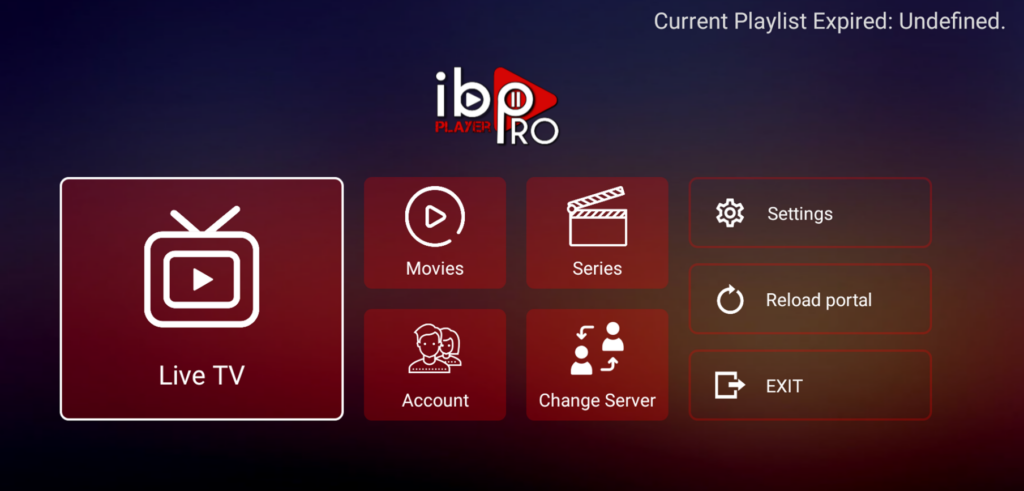
IBO Player Pro is a powerful, user-friendly IPTV client for Windows that supports M3U playlists and Xtream Codes API. It gives you instant access to thousands of live TV channels, movies, and on-demand content from your provider.
Whether you use TalkToMyTV IPTV or any other service, IBO Player delivers smooth 4K streaming on any Windows PC.
- ✅ M3U playlists & Xtream Codes API
- ✅ Full EPG (Electronic Programme Guide)
- ✅ 4K, UHD & HD stream playback
- ✅ VOD movies, series & catch-up TV
- ✅ Multiple playlist management
- ✅ Free on Microsoft Store
System Requirements Before You Start
Make sure your Windows PC meets these requirements before downloading IBO Player.
Operating System
Windows 7, 8, 10, or 11 (64-bit recommended).
RAM & Storage
Minimum 4 GB RAM and 200 MB free disk space.
Internet Speed
10 Mbps for HD · 25 Mbps for 4K/UHD streams.
IPTV Subscription
Active IPTV credentials (M3U URL or Xtream Codes).
Step-by-Step IBO Player Installation Guide
Follow these 4 steps to get IBO Player installed and streaming on your Windows PC.
Step 1 — Download IBO Player for Windows
Get IBO Player safely from the Microsoft Store — free, no third-party downloads needed.
- Press Win + S and open Microsoft Store
- Search “IBO Player Pro”
- Click “Get” — download is free and under 2 minutes
Alternative: Download the .exe installer from the official IBO Player website.
Step 2 — Install IBO Player on Windows
If using the .exe installer:
- Double-click the downloaded installer file
- Click “Yes” on the UAC permission prompt
- Follow the setup wizard — click Next
- Accept the Terms and Conditions
- Click “Install” and wait
- Click “Finish” ✅
Step 3 — Add Your IPTV Subscription Credentials
Open IBO Player and link your subscription. Two methods supported:
Xtream Codes (Recommended):
- Click “Add Playlist” → select “Xtream Codes”
- Enter Server URL, Username & Password from your TalkToMyTV subscription
- Click “Add” — channels load automatically
M3U URL: Click Add Playlist → M3U URL → paste your M3U link → Add.
💡 No subscription yet? Get TalkToMyTV — 30,000+ channels, instant activation, 14-day money-back.
Step 4 — Start Streaming Your Channels
- Live TV — Browse by Sports, News, Movies, Kids, UK, US, Arabic & more
- VOD — 100,000+ movies & series on demand
- EPG — Settings → EPG for the full TV programme guide
- Favourites — Right-click any channel → Add to Favourites
🎉 All done! 30,000+ channels in 4K on your Windows PC.
Common IBO Player Issues on Windows & How to Fix Them
- Run a speed test — need 10 Mbps for HD, 25 Mbps for 4K
- Switch to wired Ethernet instead of Wi-Fi
- Close other bandwidth-heavy apps
- Lower stream quality in IBO Player settings
- Ask your provider to switch to a less congested server
- Double-check Server URL, Username, Password — no trailing spaces
- Make sure your subscription is active and not expired
- Remove and re-add the playlist in IBO Player
- Contact TalkToMyTV 24/7 support to verify your account
- Update Windows (Settings → Windows Update)
- Update graphics drivers (Device Manager → Display Adapters)
- Uninstall completely, restart PC, reinstall
- Right-click → Run as Administrator
- Temporarily disable antivirus and retry
- Settings → EPG Settings → make sure EPG is enabled
- Verify the EPG source URL is correct
- Click “Refresh EPG” and wait a few minutes
- Confirm your provider supports EPG
- Settings → Player Settings → Disable hardware acceleration
- Switch to software video decoding
- Update DirectX and GPU drivers
- Try lower quality (SD instead of HD/4K)
Set Up IPTV on Other Devices
IBO Player works on Android, iOS, Fire TV and more. Follow our device-specific guides.
FireStick Setup Guide
Install IPTV on Amazon Fire TV Stick step by step.
Android TV Setup Guide
Configure IPTV on Android TV or Android box.
Apple iOS Setup Guide
Get IPTV running on iPhone, iPad, or Apple TV.
Samsung TV Setup Guide
Watch IPTV directly on your Samsung Smart TV.
Frequently Asked Questions
Yes. TalkToMyTV supports both Xtream Codes API and M3U — both natively supported by IBO Player.
Check credentials for typos first. If the issue persists, contact TalkToMyTV 24/7 support for instant help.
Ready to Start Streaming? Get Your Premium IPTV Subscription
TalkToMyTV gives you 30,000+ live channels and 100,000+ movies in 4K — instant activation, no contracts, 14-day money-back guarantee.
- Instant Activation
- 14-Day Money Back
- 24/7 Support
- No Contracts